The Chronicles
June 2015
Dear Friends,
Well, it’s finally here! Microsoft has just announced the release of their new Operating System WINDOWS 10 for the 29th of July 2015. Oh dear, I can just imagine many of you raising your eyebrows and saying in exasperation "why do they want me to change everything again? I've just gotten used to the last new System - aaaarrrrr". Believe me, I understand your consternation and I agree - new technologies are constantly transforming themselves. And furthermore, we need to keep up with all those changes if we want to avoid waking up one day not understanding anything anymore!
However this time, my friends, I come with good news. This new Operating System called Windows 10 is EXCELLENT. Yes, I've browsed through it high and low and I must confess that I haven't as yet found anything really unpleasant or ill-conceived. If you update from Win7, 8 or 8.1, the changes will not be too difficult, but they will be there nonetheless. You will find your way around if you probe, however an explanation of this new environment will help you greatly making this transition a harmonious experience.
So, how to proceed? All users who already have Windows 7, 8 and 8.1 will be able to download
Win 10 free of charge, starting the 29th of July and this for a full year. After that period, it is possible you will be asked to pay for this upgrade.
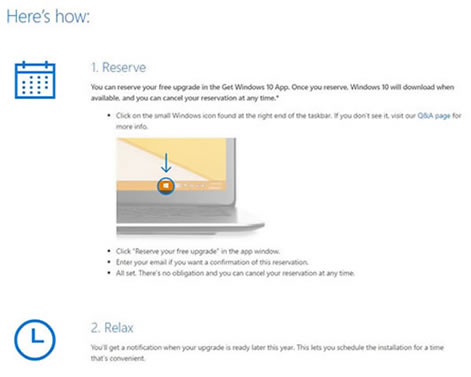
Maybe you have noticed a new icon in your "Notification Area" (see diagram). This will enable you to plan the installation of Win 10. The process will take approximately 3 to 4 hours and you will only have a few (simple) questions to answer. Let me make a couple of suggestions here.
1. Before you undertake this upgrade, save all your data on a USB key or an external Hard Drive. There should not be any migration problems but, I beg you, don't take any risks!... Back-up everything!!!
2. Make sure you know all your passwords, especially the one you use to enter your computer during its start-up (I'm not talking of the 4 digit code you may have created to simplify the opening process).
So there you have it my friends, the new news! Of course if all this upgrade process makes you nervous, I'm here to help you perform it. Equally once you have installed Win 10, I am available for lessons on how to use it. It would make me very happy to see you again...
Take good care of yourselves,
questions.monamilordi@gmail.com